Price it in minutes. Win it today.
Your own price book of calculators that turn a few sizes into materials, labour days and a price that covers every cost of running your business. Then a quote customers accept online, and a contract they sign on screen.
- 01Build your price bookYour own tabs, with an item for everything you sell. Each one is a calculator you design.
- 02Price the jobType the sizes. Materials, days and the price appear, with your costs covered.
- 03They accept onlineA quote in your design. They tick extras, type their name and press Accept.
- 04Signed on screenYour contract, filled in for you and signed in their portal. The CRM moves them to Won.
Your trade. Your tabs.
Make your own tabs, put tabs inside tabs as deep as you like, and fill them with everything you sell. Hover a tab and its sub-tabs open beside it. On a phone, tap your way down and back.
- ✓Tabs and sub-tabs, named by you
- ✓A search box that finds any item
- ✓Its own markup for any tab
- ✓Archive what you've stopped selling
Two sizes in. The whole job out.
Every item is a little calculator you build once. Staff type the sizes, and it works out the bags, the tubs, the days for each trade and a price that covers it all.
- ✓Materials with coverage, waste and whole units
- ✓Labour by day rate and how much gets done in a day
- ✓Add-ons staff can tick, like a bonding coat first
- ✓Allowances for things not chosen yet
Every cost counted. Every job pays.
Most underpriced jobs forget what the business costs to run. Keystone doesn't. It starts with what you pay, adds your share of the van, the insurance and the rest for every day on site, then your markup, then VAT.
Put in your running costs once and how many days a month you work. Keystone turns them into what each day costs, and every job that takes a day pays for one.
- 1MaterialsEach item knows what it uses per square metre, metre or each. Keystone adds your waste, works out what one bag or tub covers, and rounds up to whole units you can buy.
- 2LabourDay rates for each trade, and how much one person gets through in a day. Keystone turns that into person-days and a cost, then days on site for the crew you send.
- 3OverheadYour van, fuel, insurance, rent and the rest, divided over your working days, is what each day costs to run the business. Every day on site carries its share.
- 4Job costsSkip hire, parking, waste removal: one-off costs for the job, added by themselves to every quote or picked when you need them.
- 5MarkupA percentage or a fixed amount. Set one for the company, change it for a tab or a single item, or for one quote.
- 6Rounding and VATDays round to the half or whole day, prices to the next £1, £5, £10 or more. VAT goes on each line at its own rate, or not at all if you're not registered.
One screen. Every number.
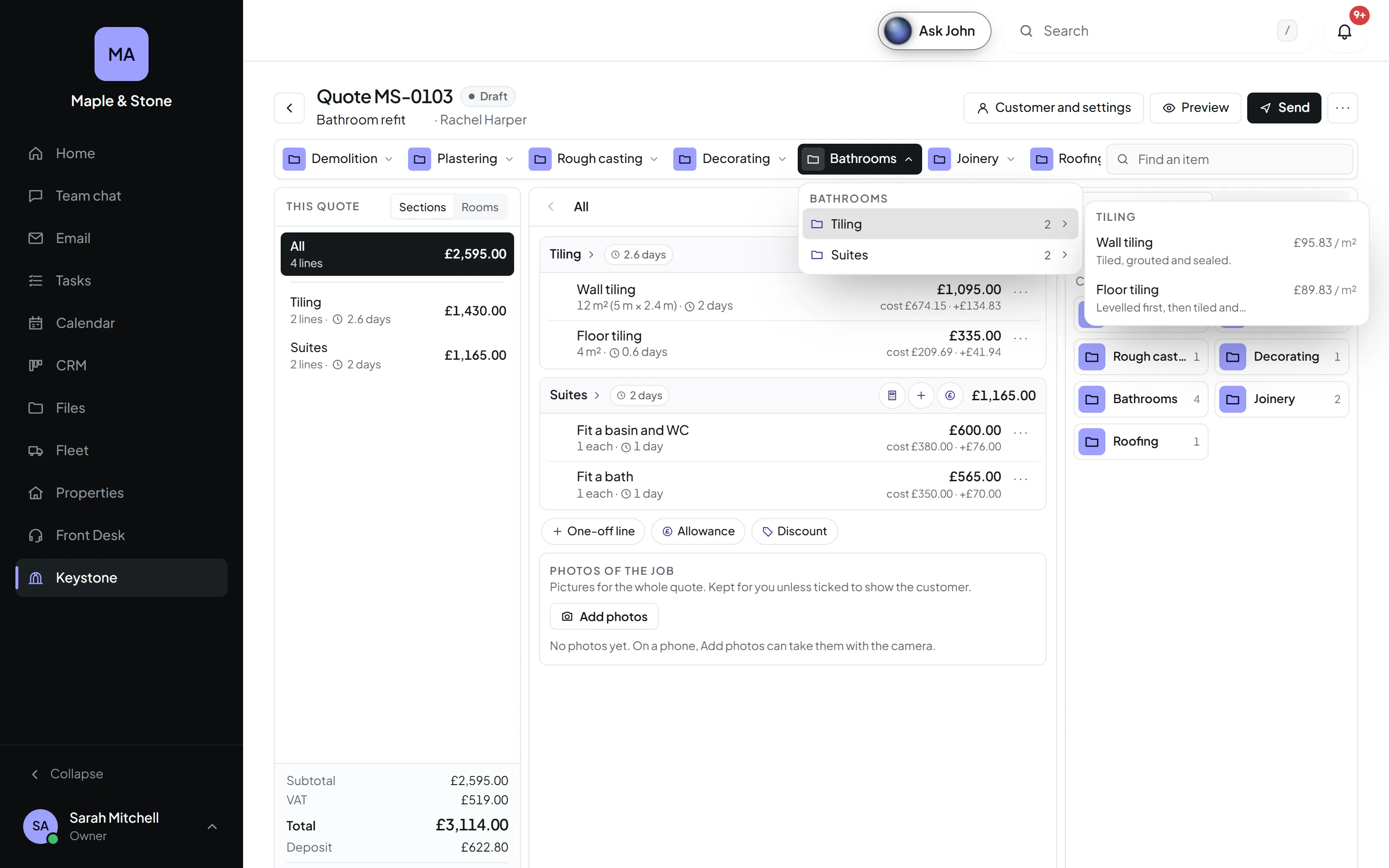
Three panels, side by side: the quote's outline, the section you're working on, and the calculator docked beside it. No pop-ups to lose your place in.
See the whole job
See the quote by its sections, or flip it to rooms and areas: Kitchen, Hallway, Garden. Totals, VAT, the deposit and the days, always in view.
Every line, explained
Each line with its sizes and days, written out for you. Reorder, mark one as an optional extra, add a one-off line or a discount.
Price as you go
Pick an item and its calculator opens at the side. Calculate it from sizes, or put in an allowance, then add it.
Your shopping list, sorted
Every bag, tub and board the job needs, totalled and grouped by where you buy it. Print it, or send it to the yard.
Your margins stay yours
A permission of its own. Estimators can build and send quotes seeing only selling prices; the costs never reach their screen.
Tick. Type. Accepted.
Send a link by email, with the PDF attached. Customers open their quote on any phone, tick the optional extras they want and watch the total change, then type their name and press Accept.
- ✓Optional extras they tick themselves
- ✓The deposit, and the days you'll be on site
- ✓Save as PDF, laid out for printing
- ✓You know the moment it's opened
Look the part. Win the job.
Three designs, Classic, Modern and Minimal, in your colour and with your logo. Choose your own words for the top and bottom, which columns show and how much detail customers see.
- ✓Every line, totals by section, or one price
- ✓Quantities, unit prices and photos, on or off
- ✓Your introduction, terms and small print
- ✓A live preview while you design it
From yes to signed. No printer.
Design your own contracts once. When a quote's accepted, the contract fills itself in and goes to the customer's portal, where they sign on screen. Then the people you choose sign for the company, in your order.
Your contract. Filled in for you.
Write your contract once, with fill-in fields for the customer, the price, the deposit and the start date. Keep the clauses you use again and again, and choose who signs.
- ✓Fill-in fields from the quote
- ✓Saved clauses, changed in one place
- ✓Company signers, in the order you choose
One finger. Signed.
Customers sign in their own portal. Then your people sign, and everyone gets a copy. A signing record keeps who signed, when, and the document's fingerprint, so you can show nothing changed afterwards.
- ✓Signed in the customer portal
- ✓A signing record with a fingerprint
- ✓A signed copy for everyone
Sends itself, if you like
Contracts go the moment a quote's accepted, or wait for someone to press Send contract with a start date.
Numbered for you
Each contract gets its own number, like C-0031, separate from your quotes.
A contract for every job
One for kitchens, one for maintenance work. Pick a default, and choose another when you send.
Accepted. Signed. Won.
Quotes show on the customer's CRM page, and CRM automations can act on them: when a quote's sent, opened, accepted, declined or about to expire, and when the contract's signed.
- ✓Move the customer on by themselves
- ✓Chase a quote before it expires
- ✓Thank-you emails from your own mailbox
- ✓The job pencilled into the calendar for its days
“Price this job.” Done.
Describe the job in your own words, typed or spoken. The assistant prices it from your price book, shows you the lines and the total, and only makes the quote when you say yes.
- ✓Uses your own items and prices
- ✓Asks before it makes anything
- ✓Only does what you're allowed to
Know what wins
Your win rate, the value of quotes sent and won, each salesperson's results, what sells best, and a month-by-month chart.
Prices up? One click.
Raise every material from a supplier by a percentage, or bring in their new price list from a spreadsheet. See every change before it's saved, and undo it afterwards.
Straight into the diary
An accepted job goes into the calendar, pencilled in or booked, for as many days as the quote says it takes.
Quote it at the kitchen table.
Quick answers.
Do I have to use the CRM?
No. Keystone works on its own and keeps its own customer details. With the CRM switched on too, you pick the customer from the CRM, their quotes show on their page, and quote automations can move them along.
Is it only for builders and plasterers?
No. The price book is yours, so it fits any trade that prices by size, time or the item: decorating, flooring, landscaping, kitchens, bathrooms, roofing, cleaning, electrics. You name the tabs and design every calculator.
Can my staff see what things cost us?
Only if you let them. "See costs and profit" is a permission on its own. Without it, people build and send quotes but only ever see selling prices; costs, markup and profit are never sent to their screen.
What if I don't know the price of something yet?
Add an allowance: a set amount for something like the tiles the customer hasn't chosen yet, or a one-off line typed straight onto the quote.
What happens when a customer accepts?
You're told straight away, the quote shows who accepted, which extras they picked and when. If you use contracts, theirs goes to their portal by itself or when you send it, and the job can be pencilled into the calendar for its days on site.
Are signed contracts kept safe?
Each signed contract keeps a signing record: who signed, in what order, when, and a fingerprint of the document, so you can show nothing changed after it was signed. Everyone gets a signed copy.
Can I change a quote after it's sent?
If you allow it, editing a sent quote makes a new version and keeps the old one to look back at. If you'd rather not, withdraw it and make a copy.
My supplier just put their prices up. Do I edit every item?
No. Raise a supplier's materials by a percentage, or bring in their new price list from a spreadsheet. You see every change before it's saved, and can undo it afterwards.
Stop guessing. Start winning.
Get early access, and be among the first to price, send and sign in Orkello.
Better together, with one login.
Every Orkello app shares the same people, the same bell and the same search.